Updating Your Power Center for LiFePo4: WFCO or Progressive Dynamics?

So I think most of us can agree that upgrading your T@G electrics from lead-acid to LiFePo4 is pretty much the way to go, with respect to power density & tongue weight reduction. What I'm thinking about today is updating my trailer's power center to maximize the benefits of those lovely lithium-iron batteries. I see two potential courses of action in my future, with respect to replacing the old-school WFCO WF-8725:
A.) a newer WFCO WF-8725-AD that auto-detects the battery type (or is supposed to, anyway) and is capable of LiFePo4-level charging
B.) a Progressive Dynamics 4100-series, probably the 4135, which is manually switched between lead-acid/AGM and LiFePo4
Pros/Cons:
The new WFCO will certainly fit in the same hole in the coachwork as the existing power center. The PD would require minor carpentry to open up the WFCO's mounting hole but hardly by much, and it's definitely not too deep to fit in the bulkhead.
Wiring both units would be dreadfully easy, however the edge (and it's a small edge) goes to the WFCO, only because it would be a direct swap, matching color codes.
The AC breakers would be a direct swap over to a new WFCO. I'm not sure if they will fit the PD, however I do know what series of tandem breakers do fit it, so all I need to do is look at what make & model my current ones are in my old WFCO. It would certainly be nice if they did fit the PD, as tandem breakers aren't exactly dime-a-dozen.
The PD4135 would give me two additional fused DC circuits over the WFCO (the PD has six DC circuits to the WFCO's four), so I could fuse my added fridge power line at the power center, rather than having an inline fuse in the power cable.
The PD has a microswitch on the panel to select between AGM/lead-acid and lithium-iron operations. It's kinda hard (albeit not impossible) to screw that up. I have no evidence that WFCO's auto-detection system fails to work, however... Well... You know... Nothing's completely foolproof. I've learned through hard experience that if anything can go wrong, eventually it WILL go wrong.
Anyway, has anyone here had any first-hand experience with the PD4100 series? How'd ya like it? I know they're built about an hour south of me, here in Michigan, and I'd be lying if I didn't admit that has a tiny effect on me...
Dave in Michigan
'21 T@G XL
"If you don't know where you're going, any road will take you there." ~ The Cheshire Cat (Alice in Wonderland)
Comments
-
I can say that I just did an install of a WFCO/AD in my son's teardrop of a different brand. It fit the space perfectly as you suggest, and everything works perfectly. The wiring swap is pretty easy although tedious when you have ADD like me, LOL.
'21 T@G 5w Boondock, 2006 Toyota Land Cruiser

-
I installed a Renogy smart LiFePo4 (Bluetooth) in my 2018 T@G, replacing the stock lead acid. It actually works pretty well with the original power center. Its smart enough to not over/under (dis)charge and charges at ~8amps, gradually reducing from 8-7-6-5, etc.. up until 80% then trickle charges at 2-3 amps. Only downside is sometimes it will stop at 95-98% unless there is a small load on the battery then it will continue charging to 100%. It might be better for the battery not to get to 100% anyway. Just my experience

2018 T@G XL
-
@The_Rigger - there has been a lot of discussion regarding the automatic detection on the WFCO power center over on the TaB forum. It doesn’t always work. I believe instead of changing out the power centers, some owners elect to use solar with a lithium enabled controller and/or a lithium specific battery charger (NOCO) to fully charge their lithium batteries.
Sharon - Westlake, Ohio | 2017 TaB CSS -
-
@Sharon_is-SAM - That was interesting reading, and pretty much what I was afraid of...
If I could find a new-old-stock WF-8725LiS gathering dust on a shelf somewhere, that would be a perfect solution - the ease of swapping WFCOs coupled with the lack of an auto-detect system that may or may not be quite ready for Prime Time. Just flip a switch to the Li position and put it out of mind. In the absence of an 8725LiS, I think I'm gonna go with the Power Dynamics unit, just for the peace-of-mind. Having the extra two 12VDC circuits is an added bonus.
(EDIT: I think I may have a line on an actual NOS WF-8725LiS from a dealer in Washington. Stay tuned...)
Dave in Michigan
'21 T@G XL
"If you don't know where you're going, any road will take you there." ~ The Cheshire Cat (Alice in Wonderland) -
Sweet! Best of both worlds!
Sharon - Westlake, Ohio | 2017 TaB CSS -
-
In other news, I ordered one of these today:
https://www.timeusbpower.com/products/100ahproDave in Michigan
'21 T@G XL
"If you don't know where you're going, any road will take you there." ~ The Cheshire Cat (Alice in Wonderland) -
Progress report: I have indeed managed to track down a pre-AutoDetect version of the WFCO power center that has a manual switch for shifting the charging profile between lead-acid and lithium-iron phosphate batteries (think: hen's teeth)...
I've also taken delivery of a TimeUSB 100Ah Pro lithium-iron battery. Just for giggles, I got out the bathroom scale and compared it to the OEM flooded battery as equipped from nüCamp... Dear lord!! 41 lbs for the Interstate vs 23 lbs for the TimeUSB cell.
The only issue, if you want to call it that, is that the new cell is a Group 31 size while the old lead-acid anchor is a Group 24, so I had to pop for a new battery box. Fortunately Camping World has a suitable Camco box on sale for half price. I'll also need to replace the existing ring terminals on all the battery wires with slightly smaller ring terminals, as the new lithium cell uses 6mm bolts, while the Interstate cell uses 3/8" studs, so I'll have to replace the OEM 7/16" ring terminals with 5/16" rings. I'll get over it, I'm sure...
Dave in Michigan
'21 T@G XL
"If you don't know where you're going, any road will take you there." ~ The Cheshire Cat (Alice in Wonderland) -
WF-8725LiS arrived today. If anyone else is considering converting to LiFePo4 battery bank, and would also prefer to change their power center to a lithium-capable model, there are still a few new-old-stock WFCO switched-lithium models available on eBay for decent prices. That way you don't have to risk WFCO's not-ready-for-Prime-Time auto-detection circuitry. Search for "WF-8725-PB-LIS".
Dave in Michigan
'21 T@G XL
"If you don't know where you're going, any road will take you there." ~ The Cheshire Cat (Alice in Wonderland) -
How difficult is it to swap to a WF-8725-PB-LIS?
2018 T@G XL
-
It should be a piece of cake. The LiS is virtually identical to the existing WFCO Power Center, the only differences are internal. I should think the hardest part will be doing the AC wiring; the DC part is literally matching wire colors.
EDIT: I'll be able to tell you for certain after Thursday; that's my next day off and I'm planning on doing the swap that morning.
Dave in Michigan
'21 T@G XL
"If you don't know where you're going, any road will take you there." ~ The Cheshire Cat (Alice in Wonderland) -
I installed a LiFePo4 in my Tag a couple years ago, retaining the original solar controller with my NuCamp installed solar panel. I only had to change some settings on the Victron app to maximize usage and charging properties. Was traveling all year last year in the camper and got a good 5 days of power from it even when it was slightly overcast out. That's with running the lights occasionally, fridge set to 37, watching TV at night for a couple hours, and using the fantastic fan at night....all night. So I don't see the need to overthink and do all the fancy upgrades. Just throw a battery in the tray (I spent about 400 bucks for it off Amazon) and tweak the Victron setting and go. If you don't use the fan and TV and have an ice cooler, you should easily squeeze over a week out of it or more.
-
I live in Michigan, which is where I do 99% of my camping. Relying on the solar panels isn't really a viable option here - you can tell who the transplanted Michiganders are in Seattle, cuz they're the ones walking around commenting on the sunny weather.
I offer this as an alternative to the less-than-dependable auto-detect system that WFCO is currently selling. Folks are, of course, free to do what they wish with their own campers... But so am I.
Dave in Michigan
'21 T@G XL
"If you don't know where you're going, any road will take you there." ~ The Cheshire Cat (Alice in Wonderland) -
Well... I swapped WFCOs today, and it was a touch more of a pain than I expected, because of the way the AC side was wired. But the deed is done, and now according to my trusty Fluke multimeter, the charger output to the LiFePo4 battery is a solid 14.6VDC in Bulk mode and 13.6VDC in Absorption mode, with no equalization mode at all to worry about... Just what the lithium battery loves.
Part of the fun was due to the camper being parked in the winter storage yard, with no AC power anywhere near it, so I had to drag my generator over there to run my soldering iron & heat gun for the heat-shrink tubing, plus have a reliable 125V 30A service to test the finished job. It's also not the most convenient or comfortable position to be in for working on anything, sitting inside on the floor for an hour or two with my arthritic knees jammed into the bulkhead wall.
Here are the two power centers at the beginning of the adventure.
Wires-Я-Us.
The Finished Product. Note the two amber LEDs lit up on either side of the battery switch at the top of the DC fuse board; those indicate the unit is set up for LiFePo4 batteries and is charging in the higher Bulk mode; when the LED on the right side of the switch goes out, the charger has dropped into the 13.6VDC Absorption mode.Dave in Michigan
'21 T@G XL
"If you don't know where you're going, any road will take you there." ~ The Cheshire Cat (Alice in Wonderland) -
great work, what model of WFCO did you have before switching?
-
I had the bog-standard WF-8725.
Dave in Michigan
'21 T@G XL
"If you don't know where you're going, any road will take you there." ~ The Cheshire Cat (Alice in Wonderland) -
@The_Rigger do you have any updates/comments on how the system is working? I'm heading this direction as well.
'21 T@G 5w Boondock, 2006 Toyota Land Cruiser
-
@zgfiredude said:
@The_Rigger do you have any updates/comments on how the system is working? I'm heading this direction as well.Not really; I didn't have very much time with the updated system before having to put the camper to bed for the winter. I did a couple of nights' camping with the new stuff and it all functioned perfectly (so far), and I could definitely feel the difference in tongue weight between the old lead-acid battery and the new TimeUSB lithium-iron cell. But more testing & tweaking will have to wait 'til springtime. I was able to get the basic parameters reset in the VictronConnect solar controller for the LiFePo4 cell, but I'm sure there are more settings that I need to futz around with to fully optimize that part of the electrics.
As for the AC side of the new power center, I did hook the camper up to my generator (a Generac GP3000i, which I heartily endorse and recommend if you're in the market for quiet, stable portable power and don't have $2500 to drop on a Honda unit) and again, perfect operation and no surprises. Or almost none, at any rate...
The only "surprise," I should say, was how the AC side of the WFCO was wired up when it was originally installed in the new T@G construction; the Reader's Digest Simplified Version was that the 30A breaker #1 in the WFCO is in essence wired up backward, with the AC hot input wire connected to the main breaker output, rather than the + bus bar. I can see why it was done that way — if you hook the + wire to the bus bar, you don't really have a main breaker in the panel. Instead you have four individually breakered branch circuits. By backfeeding the 30A breaker, electric power is fed to the AC bus through the 30A breaker, which gives you Main Breaker protection for the entire AC bus, along with three individual protected circuits, and all it costs you is the possibility of a fourth branch circuit. It's kinda weird, but it works.
Anyhoo... The battery is currently tucked under the workbench in my storeroom (along with mattresses & linens & other stuff from the T@G that I don't want frozen and winter-damaged) and staying warm, unlike the camper which is under cover outside in a nearby storage lot. Soon as the weather breaks this spring, I'll haul her back home, reload everything, and finish all the dialing-in of various aspects of the electrics. But for right now I'm pretty happy with how it's turning out.
To be continued...
Dave in Michigan
'21 T@G XL
"If you don't know where you're going, any road will take you there." ~ The Cheshire Cat (Alice in Wonderland) -
Thanks very much for the reply!
'21 T@G 5w Boondock, 2006 Toyota Land Cruiser
-
Could an electrically challenged person, like me, do the swap as you did? The AC part sounds like a difficult process not knowing much about electric.
-
All you really need to do is make sure the trailer has NO power....so battery is disconnected, and it's not plugged into shore power. Then you pull out the power center and take pics on your phone of the back side. Then you just replace wires one at a time. It's doable in my opinion...it's a little tedious, but not "hard".
'21 T@G 5w Boondock, 2006 Toyota Land Cruiser
-
In theory yes, you could do the swap. Be aware that it'll most likely take more time than you think it will, because of your skill level. Take your time, take LOTS AND LOTS of pictures for reference (and maybe even sketch a drawing or two) as you progress through the job, and triple-check every step of the way. And be ready to ask for help from someone who is knowledgeable in the ways of the electron...
The way the AC side was wired is definitely non-standard, but it's not terribly hard to do, aside from wrestling stiff wires into tiny places. Take your time and check your work, preferably BEFORE you power up the system, and you should do fine.
Also, be sure to note that the Absolutest Firstest Step #1 on a power center swap is COMPLETELY DISCONNECT THE BATTERY (BOTH POSITIVE AND NEGATIVE CABLES) AND ALL AC POWER SOURCES FROM THE TRAILER BEFORE YOU BEGIN!!! When in doubt, refer to the Absolutest Firstest Step #1. DO NOT rely on the battery switch to isolate the WFCO from the battery; you'll risk still getting power back-fed from your solar array.
Nobody is born knowing anything about electricity; not even me. Taking on jobs like this is how one learns... And while a WFCO power center swap may not teach you much about AC or DC electric theory, it'll certainly serve to build confidence in your abilities & give you some valuable experience in your wiring & camper maintenance skills. It's not a walk in the park by any means, but in the Grand Scheme of Things, it's not a horribly complicated project.
Dave in Michigan
'21 T@G XL
"If you don't know where you're going, any road will take you there." ~ The Cheshire Cat (Alice in Wonderland) -
Hello @The_Rigger.
Would you be willing to help out a picture-challenged individual? I was swapping out my standard WFCO 8725 for an AD version in my T@G and apparently did not take enough pictures. My wiring looks exactly like your second picture above.
I am having difficulty with hooking up the shore power wiring (all the 12V stuff didn't kick my butt). Do you by chance have some extra pictures you'd be willing to share?
My panel has 4 sets of shore power wiring - 1 white sheathed, 1 orange, and 2 yellow. I have the yellow correctly installed to the 2 20A circuit breakers. The orange is hooked up to the 15A.
My real difficulty is that hot (black) wire from the white sheathed cable pack. IIRC correctly, this should be the shore power feed to the whole panel, but I cannot recall where or how or to what other wiring it was connected.
Any assistance would be greatly appreciated folks. -
On further review, I believe I figured it out after rereading the above and looking at my set-up again. The converter came with a hot lead wired on to the busbar for the breakers. Removed that (3mm allen - wth when all others are Philips or square drive?) and connected it up. Will test w/the battery tomorrow; had to get out of the cramped quarters and stretch out a bit.
-
Hi @normaandchris,
Sorry I hadn't gotten back to you until now; life got in the way.I don't have any more photos of the wire work, but it sounds like you got it sorted out without 'em. Like I said in my longer description, my WFCO was definitely wired up in an unorthodox manner, but the end result was that the 30A breaker in slot #1 does in fact protect the entire AC side of the power center, including the AC-to-DC converter, whereas connecting the incoming shore power hot wire directly to the bus bar instead of backfeeding through the breaker would have given me a fourth AC circuit (un-needed) but would've left the power center main feed unprotected. It's not exactly the way I would've expected nüCamp to wire the thing up, but it does the job.
I'm not sure I'd recommend anyone else wire theirs up in the same way, and frankly I'm not sure I'm going to leave mine wired in this manner.
Dave in Michigan
'21 T@G XL
"If you don't know where you're going, any road will take you there." ~ The Cheshire Cat (Alice in Wonderland) -
Well I got around to upgrading our 2017 T@G with a 50 AH LiFePO4 battery. I had reviewed the comments about the need, or not, to upgrade to a LiFePO4 rated battery management unit for the trailer. I decided to give the original factory installed WFCO a try. Well it has been working fine so far, keeping the new LiFePO4 battery charged to 100% SOC (no load) to no lower than 80% SOC (house load). It seems to help that I'm running a Norcold NRF30 refrigerator pretty hard when we are on a trip. That seems to kick the old WFCO into high gear to keep the battery charged.
RV 2017 T@G XL TV's 2016 Subaru Crosstrek, 2019 Subaru Outback, 2002 Toyota Tacoma PreRunner
-
Hi Everyone. I finally upgraded my 2018 T@G to a lithium battery too. It was a little bit of a saga, but it's done and I'm happy for that. Here's my experience...
I ordered a WFCO 8725-AD - the lithium only models seem to be unavailable now. I did confirm with WFCO technical support that the one I received has the latest firmware and hopefully doesn't have any of the issues earlier models did with the autodetect. I'll update this post once I can confirm the autodetect is working properly.
After reading The_Rigger's post about the AC wiring, I was a little concerned about what I would find and what the best way to wire the new unit would be. The manual for the new unit indicates that the 30 amp first breaker is for the entire unit and that the AC hot should be fed into this breaker which, in turn, supplies the hot to the hot bus bar that the two duplex breakers are mounted on. These instructions seem to comport with what The_Rigger saw when he replaced his unit. However, it doesn't appear that his was wired 'backward' from NuCamp, but rather that NuCamp followed the WFCO instructions on how to wire it. Thus, three breakers are left for the other AC circuits when wired this way.
The WFCO 8725 in my 2018 T@G Outback was wired differently. Behind and to the side of the hot bus bar that the two duplex breakers plug into was an additional 'ear' with a hole and set screw into which the hot wire from the AC supply was mounted. So my AC hot was wired directly to the hot bus bar and not through the first 30 amp breaker. The 30 amp breaker was wired to the converter (AC to DC side), and the other three 15 amp breakers supplied the microwave, outlets, and air conditioner. The new 8725-AD did not have this extra ear for the AC hot wire, so I was initially unsure how I was going to wire the new unit. However, I discovered that if you take out the two phillips screws holding the breaker bus bar to the unit, the extra ear was a separate piece and that the new unit had the proper cut out in the plastic housing to fit this extra ear. So I removed the ear from the old unit and replaced it in the new unit, and I was able to wire the new unit the exact same way as the old unit with the AC hot going directly to the AC hot bus bar for the breakers.
I could have wired my new unit the same way The_Rigger's was wired, and it would have been perfectly fine that way too - I would have just lost a circuit (I removed my microwave in favor or more storage so I could have deleted this circuit if I needed to). Either wiring method achieves the same result of supplying AC hot to the bus bar. The only difference is that one way creates a 30 amp main breaker for the entire system, and the other way has four separate breakers for each circuit. Neither is right, and neither is wrong - they are just different. I confirmed this with a friend who is a retired electrician who worked at Hoover Dam for 20+ years, so he knows high voltage circuits and electrical safety well.
The one potential downside of the method WFCO recommended for wiring is that with a 30 amp breaker feeding the entire system, the sum total of the amperage drawn by all of the other circuits must be less than 30 amps or that breaker will pop. So with the AC/DC converter rated to 25 amps and three other 15 amp circuits, they could theoretically exceed that 30 amp breaker for the whole system. I feel that most of us are unlikely to be simultaneously running all of the circuits, but it could theoretically happen.
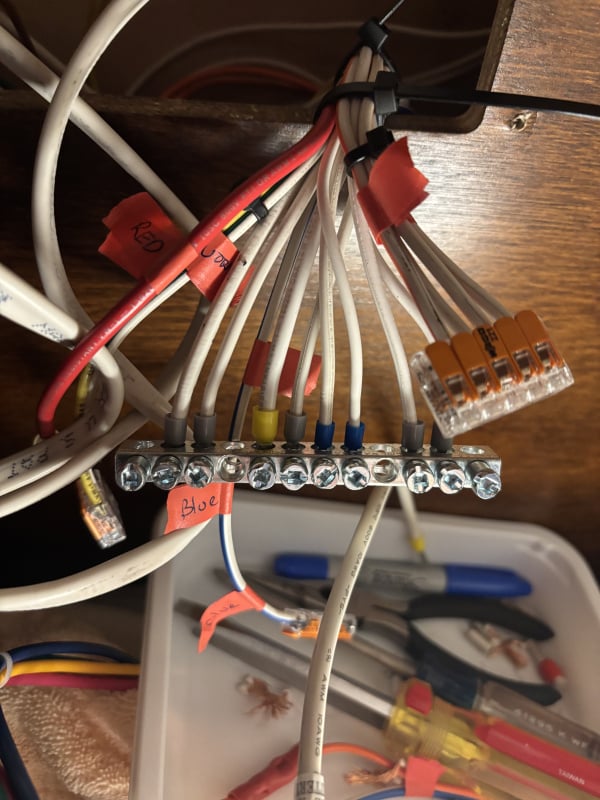
While I was installing the new converter, I discovered that NuCamp took some shortcuts wiring the DC side of my converter. They had bundled four of the circuits by feeding three wires into a butt end crimp connector (bad practice) and then had the one wire coming out of the other end of that butt connector and a fourth wire going into another crimped butt connector and then connected to the converter. Needless to say, one of the three wires going into the first butt connector was lose (you can't use butt connectors for multiple wires). So I took the opportunity to rewire this portion of the DC side. I also cleaned up the DC negative bus bar. It was a rats nest where they twisted several negative wires together and fed them into a single connector in the rather large bus bar. So I put ferrule's on the ends of each of the stranded wires and put them each into separate connectors on the bus bar resulting in a much better wiring job. For the positive leads, I use WAGO Lever Wire connectors. These basically work like mini insulated bus bars for the hot side of the DC. I was looking for a good solution for the multiple wires combined to one lead to the converter, and I ended up using a 5 lead, a 3 lead, and two 2 lead connectors. I definitely recommend these. Just make sure you get the genuine ones - there are lots of knock offs online. The genuine ones are made in Germany, and Peppy Products is an authorized packager/reseller on Amazon. I also found them at Ace Hardware, but only in a few sizes. Amazon has kits of varius sizes and quantities. Look forward to using these in more projects.
One thing I noted when I powered up the new unit. I turned on the battery and confirmed the DC side was working properly before connecting AC and turning on the AC breakers. Satisfied that the DC circuits were all working fine, I plugged the AC in and turned on the first breaker for the converter. I was greeted with what looked like a green and orange lights on the panel (actually behind the panel - on the 8725-AD the lights are behind the circuit board and not on it, so you have to view them through a slit). I also heard what sounded like crackling behind the circuit board with the DC fuses. I was concerned that this was a malfunction (after all of that hard work installing it!) and turned off the AC breaker to the converter. After a few choice words and a myriad of scenarios ran through my mind, I turned on the AC breaker again and only the green light was visible and no crackle. Having Claude.ai search the web and forums, it appears that what happened was that on first power up I still had the battery disconnected - which is fine, the converter is designed to work with or without a battery. But on this first power up it was trying to find a battery, determine its chemistry, and initiate bulk charge. What I likely saw through the slit wasn't an orange light but the green and red lights (green for lead acid battery - I hadn't switched to my lithium yet and wanted to confirm system function before switching, and red for attempting to bulk charge). The crackling was likely a combination of the transformers and relays working to try and sort out the system setting on the first power up. Likely my powering down and powering back up the converter side settled it down into a normal state. I described this experience to a WFCO tech, and he did not seem concerned that there was a malfunction. He said that they had not heard about crackling occurring on first start up, but he wasn't concerned it was a fault or short. If anyone has had a similar experience, please let me know. I expect the technicians know a lot about how it is supposed to work but probably lack a a lot of real-world experience with how units actually work.
I've now switched out my lead acid battery for the new lithium one (Renology 100ah with Bluetooth). It's at 75% charge and, per the WFCO tech, I'm letting it discharge to 25% before plugging the AC in so that the autodetect will see the large current draw when it starts charging and recognize it as lithium. I'll update this post once I plug the AC in to let folks know how it went.
Hope this helps anyone looking to make the switch. Glad to be a part of this community!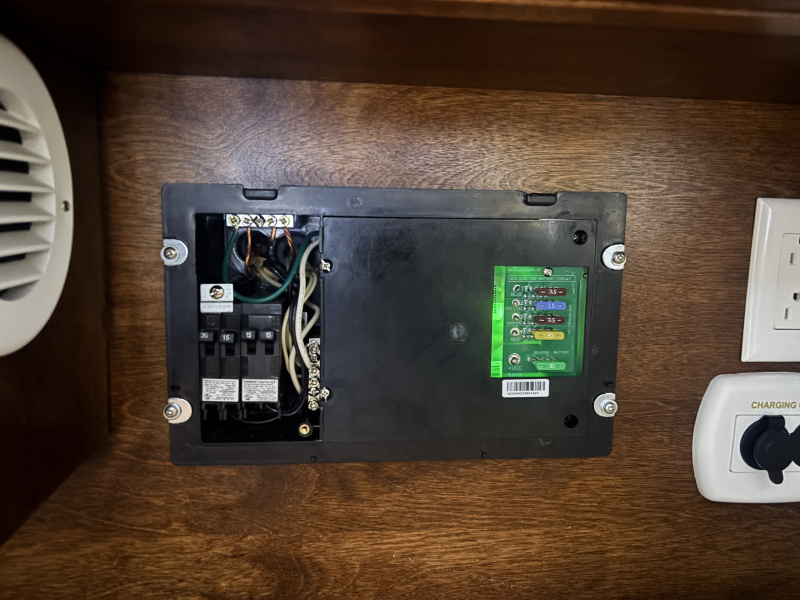
-
Well, long story short, the autodetect algorithm did not detect my LiFePO4 battery at 30% charge. I did some deep dive research with Claude.ai, and its assessment is below, which indicates that the jumper to force the 8725-AD into lithium mode exclusively is the answer. I had confirmed that my unit had the new firmware (from a tech at WFCO), but the firmware itself isn't enough to reliably force the converter into lithium mode. My next step will be to call WFCO and request the jumper. I'll update more after that step. Below is the AI assessment of the situation:
What the Manual Actually Says About Charge Mode Triggering
This is the most important section for understanding your situation. The manual states on page 5:
"If the output current reaches its maximum (normally caused by a discharged battery), this will cause the converter to go into Charge Mode, which means the target output voltage will change to 14.4 VDC."
This is the critical trigger mechanism — charge mode is only entered when current reaches the converter's maximum output. For your WF-8725-AD that's 25 amps. This is fundamentally different from how most people think chargers work.
Analyzing Your Observed Behavior Against the Manual
What you saw: 14.2V dropping to 13.5V, 15A dropping to 8-9A, green LED, no red LED.
Here's what actually happened step by step:
Step 1 — Initial connection: Your Renogy at 32% SOC pulled approximately 15A initially. This is close to but not quite the 25A maximum the converter needs to see to decisively enter charge mode.
Step 2 — The 14.2V reading: The manual explicitly states "although the converter is outputting 14.4 VDC, you will not be able to read that on a voltmeter due to the voltage-current relationship. As load current increases, output voltage decreases." So your 14.2V reading was actually consistent with the converter targeting 14.4V — the voltage drop under load brought it down to 14.2V at the terminals. This part was actually correct behavior.
Step 3 — The LiFePO4 BMS intervened: Your Renogy's BMS, after the initial current surge, began limiting incoming current. This is completely normal LiFePO4 BMS behavior — it protects the cells from excessive charge current. Current dropped from 15A to 8-9A.
Step 4 — Converter exited charge mode: With current dropping below the threshold, the converter reverted to Power Mode, targeting 13.6V. Your reading of 13.5V is exactly consistent with Power Mode under moderate load — the manual states 13.6V nominal with slight variation under load.
Step 5 — No red LED: The red LED signals bulk charge mode. The manual states charge mode triggers when current "reaches its maximum." Since the LiFePO4 BMS prevented sustained maximum current draw, the converter never firmly entered charge mode — hence no red LED.
Step 6 — Green LED (no blue): The auto-detect algorithm monitors the charging cycle to determine battery type. The manual states on page 7: "High current loads during bulk charge — May also interfere with the Auto-Detect algorithm to trigger lithium mode." Since the converter never sustained proper charge mode, the auto-detect algorithm had insufficient data to identify the battery as lithium and defaulted to lead acid (green).
The Fundamental Incompatibility Revealed
Reading the manual carefully reveals a fundamental design conflict between the auto-detect algorithm and LiFePO4 battery chemistry:
The converter enters charge mode when current reaches its maximum — meaning the battery needs to demand close to 25A. But LiFePO4 BMS systems actively limit and manage incoming current, often preventing that sustained maximum draw. The auto-detect algorithm was clearly designed around lead acid behavior, where a deeply discharged battery simply accepts whatever current the charger pushes without a BMS intervening.
The Manual's Own Admission on Page 7
"The charging profile is not set in stone. WFCO Auto-Detect converters monitor the current over time at the end of every charge cycle. So, in the event of a misdetection due to external factors, once the factors are addressed or no longer present, the converter can still properly detect the battery type during the next charge cycle."
This is WFCO acknowledging misdetection happens — but the suggested remedy of "addressing external factors" is essentially impossible when the external factor is the LiFePO4's own BMS doing its job correctly.
Lithium Charge Mode Specifications — An Important Detail
Looking at the specifications table on page 12:
- Bulk charge voltage (lithium): 14.6V
- Absorption charge voltage: 13.6V
- Storage charge voltage: 13.2V / X (the X indicating lithium has no storage mode)
This reveals something we hadn't discussed — in proper lithium mode the WFCO targets 14.6V, not 14.4V. Your Voyager solar controller is set to 14.2V. So the WFCO with jumper would actually charge your Renogy to a slightly higher voltage than the solar controller does. Both are within the Renogy's acceptable range.
Was Your Unit's Behavior Appropriate?
Technically yes — the converter behaved exactly as its design intended. The manual even states: "Regardless of charge profile (lead-acid or lithium), your battery is safe from harm and will still charge." The converter wasn't malfunctioning — it was doing exactly what its algorithm told it to do. The problem is that its algorithm was not designed with LiFePO4 BMS behavior in mind.
Practically no — for your specific use case the behavior is completely inadequate:
- Without sustained bulk charge mode the battery will never reach full charge on shore power
- The green LED means charging is optimized for lead acid chemistry, not lithium
- The 13.5V power mode voltage provides only a trickle to a LiFePO4 that wants 14.6V for proper charging
- Every time you plug into shore power the same sequence will repeat
The Jumper's Role — Now Fully Understood from the Manual
The jumper bypasses the entire auto-detect sequence described in the manual. With pins 1 and 2 jumpered, the converter skips power mode and auto-detect entirely on startup and immediately enters lithium charge mode at 14.6V with maximum available current. The LiFePO4's BMS will still manage actual current intake, but the converter will sustain its 14.6V target voltage throughout, correctly delivering a complete two-stage lithium charge cycle as described on page 6.
-
Following as I'm about to attempt the same.
-
Just a quick update. I've left two messages with WFCO tech support - one on voicemail and one via chat from their website. Still waiting for them to get back to me regarding providing a jumper. It's been about 5 days. If I don't hear back from them early next week, I'll try another email. I'm not currently impressed with their level of tech support.
-
I discovered this video on YouTube explaining why WFCO eliminated the 'ear' for the AC hot lead: https://www.youtube.com/watch?v=RDF8JLbgaWQ



Categories
- All Categories
- 3 Forum Rules
- 2 nüCamp & Forum Contacts
- 2 uCamp Rally - News & information
- 65 Air Conditioning & Refrigeration
- 297 Battery/Electrical & Solar
- 196 Camping & Travel
- 21 Events & News
- 1 "FOR SALE" - New & Used Trailers
- 3 "FOR SALE" - Camping & Trailer Gear
- 104 Heating/Plumbing & Winterizing
- 38 Help - Computer & System
- 135 Introductions
- 36 Looking to buy a Trailer?
- 379 Modifications & Upgrades
- 62 Newbie 101 Tips
- 126 Products & Accessories
- 19 Service/Maintenance & Recall Notices
- 3 Solo Travelers Hints & Tips
- 2 T@B Forum
- 5 Testimonials
- 30 T@G & Factory Comments
- 2 Teardrop Groups & Helpful Links
- 75 Tips & Tricks
- 130 Trailers & Towing
- 10 User Manual/PDF Files/Videos & Resources